Streamline Your Sales with Professional Pricing Catalogue Templates
Creating a polished sales sheet or wholesale catalog used to require significant investment in design software and hours of layout work. Today, tools like Canva have democratized design, allowing small business owners to produce high-end materials without a steep learning curve. The challenge, however, remains in the execution. A blank canvas can be intimidating, and achieving that professional "editorial design" look often requires a deep understanding of grid systems, typography hierarchy, and visual balance.
This is where a robust Pricing Catalogue Template becomes an invaluable asset. It is not merely a document with blank spaces; it is a structured framework designed to bridge the gap between your raw product data and a compelling sales presentation. Whether you are a crafter selling handmade goods, a designer launching a new collection, or a manufacturer looking to expand your retailer network, the right template ensures your products are presented with the professionalism they deserve.
The Anatomy of an Effective Sales Sheet
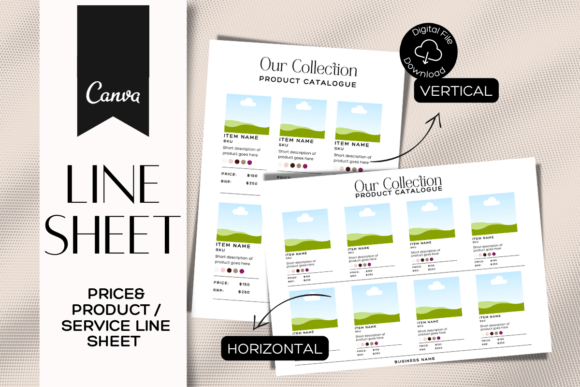
When we talk about a "line sheet" or "pricing guide," we are referring to a specific type of editorial design intended to facilitate a transaction. Unlike a mood board or a lifestyle lookbook, a pricing catalogue must prioritize clarity and information density. The visual characteristics of a high-quality template in this category are defined by a clean, minimalist aesthetic. The goal is to create a "visual hierarchy" where the product image is the hero, but the pricing and SKU information is immediately accessible.
The personality of these templates is strictly professional yet approachable. You will rarely see ornate script fonts or chaotic layouts in a successful wholesale catalog. Instead, the style relies on strong sans serif font choices for readability and generous white space to prevent cognitive overload. The overall appeal lies in its utility; it is a tool designed to convert interest into orders. A well-designed template respects the retailer's time by organizing information logically—grouping products by category, clearly stating minimum order quantities (MOQs), and providing unambiguous pricing tiers.
Practical Applications and Brand Consistency
The versatility of a digital Pricing Catalogue Template extends far beyond simple product listings. For entrepreneurs and marketers, these assets serve as the backbone of B2B communication. Imagine a scenario where a boutique owner requests your catalog. Sending a hastily assembled spreadsheet or a low-resolution PDF can damage your brand identity before they even see the product. Conversely, a beautifully formatted PDF—created using a template that supports US Letter, A4, and A4 Horizontal sizes—signals that you are a serious, organized vendor.
Furthermore, the ability to customize these templates in Canva allows for seamless integration with your existing brand identity. You can upload your own photos, adjust the color palette to match your brand guidelines, and even swap out fonts if you have a specific modern typography style you prefer. This level of customization ensures that whether you are emailing a PDF or printing a physical booklet, the visual language remains consistent. This consistency builds trust with potential clients, reinforcing your brand's reliability.
Strategic Design Elements for Maximum Impact
A successful catalog is more than just a grid of images; it requires a strategic approach to visual hierarchy. When utilizing a template, consider how the eye travels across the page. Typically, a viewer looks at the image first, then seeks the price, and finally reads the description. A high-quality template is pre-structured to facilitate this natural flow.
For products with multiple colorways, the template should allow for a "swatch" approach or a multi-image layout that doesn't clutter the page. For items with complex specifications, such as materials or dimensions, the layout must accommodate long and short product descriptions without disrupting the grid. This is where the "drag and drop" functionality of the editor becomes a practical advantage. You can duplicate pages for a best-seller line or rearrange sections to highlight a new seasonal collection. This adaptability is crucial for content creators and designers who need to update their materials frequently without starting from scratch every time.
Optimizing Your Workflow with Editable Assets
The true value of a digital template lies in its reusability. A Pricing Catalogue Template is not a one-time use document; it is a living asset that evolves with your business. By utilizing a platform like Canva, you eliminate the need for expensive software subscriptions or specialized design skills. The "unlimited revisions" capability means you can update inventory, adjust pricing, or swap out seasonal imagery in minutes.
Consider the practical workflow benefits. When a new product launches, you simply upload the image, update the text, and export. This speed-to-market is vital in competitive industries like fashion, home goods, and packaging design. Moreover, the mobile editing capability allows for last-minute changes even when you are away from your desk—a common scenario for small business owners and crafters who are often on the go.
Key Features to Leverage:
- Photo Customization: Use high-resolution, professional photography. The template provides the frame, but your image provides the context. Ensure your photos are well-lit and styled to match the aesthetic of the layout.
- Typography and Fonts: While the template comes with suggested font pairings, feel free to experiment. A clean sans serif font is usually best for body text to ensure legibility, but you might use a bold display font for headers to inject some personality.
- Color and Branding: Don't just settle for the default colors. Input your specific hex codes to ensure the catalog feels like a natural extension of your website and social media graphics.
- Page Management: Don't be afraid to duplicate a successful layout. If a specific page layout works well for your accessories, clone it for your apparel section to maintain visual consistency.
Finalizing Your Wholesale Presentation
Before you send your catalog to that "dream retailer," take a moment to view it through the lens of a buyer. Is the pricing clear? Is the contact information easy to find? Does the overall design support the perceived value of your product? A Pricing Catalogue Template provides the professional skeleton, but you provide the muscle and the personality.
By leveraging these design assets, you are not just organizing data; you are crafting a sales experience. You are telling a story where your product is the protagonist and the retailer is the partner. Whether you are a blogger expanding into merchandise or a seasoned manufacturer refreshing your sales tools, the right template empowers you to present your business with the polish and precision of a major brand, ensuring that your first impression is a lasting one.