Design Professional KDP Covers in Minutes with Canva Templates
For independent publishers and content creators, the journey from manuscript to a finished Amazon KDP book involves a critical design phase. The cover is the first interaction a potential reader has with your work, setting expectations for the content within. Creating a professional, market-ready cover often requires time, design skill, and specialized software. A practical solution exists within a familiar platform: a curated collection of templates designed for this exact purpose. This approach streamlines the process, making professional design accessible directly within Canva.
What Is This Canva KDP Cover Template Bundle?
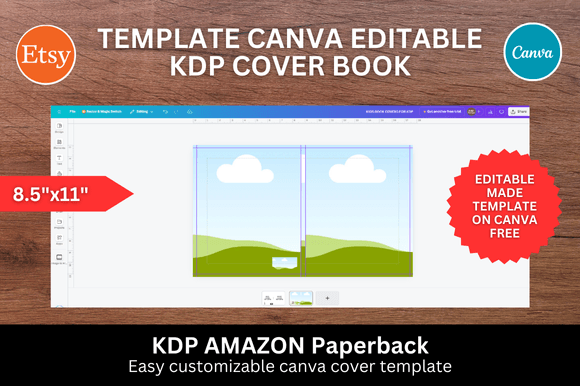
Think of this bundle not as a single rigid file, but as a foundational toolkit. It provides a series of pre-structured Canva templates, each formatted to the precise 8.5 x 11 inch dimension required for standard journal and book covers on Amazon KDP. The collection is versatile, including one primary book cover template, five designs specifically tailored for children's books, three clean label text cover options, and a selection of essential interior page templates like lined, grid, and dot paper. It also includes five distinct pattern files intended for creating unique, textured backgrounds.
The true strength of these templates lies in their visual personality and functional simplicity. They are designed with a clean, modern aesthetic that prioritizes clarity and professionalism. The layouts employ strong visual hierarchy, guiding the eye naturally from the title to the author name and any supporting imagery. This isn't about flashy, trend-dependent graphics; it's about providing a solid, adaptable structure. The included patterns offer a way to add depth and character without overwhelming the primary text elements, supporting a range of styles from minimalist to more decorative. The overall appeal is one of efficiency and polish—these are design assets built for real-world publishing tasks.
Streamlining Your Publishing Workflow
The practical application of this bundle extends across various projects. An entrepreneur creating a series of guided journals can use the label text covers for a cohesive brand identity. A crafter designing a niche notebook can leverage the dot grid or lined paper interiors. The children's book templates provide a starting point that respects the unique needs of that genre, often requiring more playful typography and image placement. For marketers or bloggers, these templates can be repurposed for lead magnet ebooks, workbooks, or branded content guides, ensuring visual consistency with other marketing materials.
Using the bundle is straightforward. After accessing the templates in Canva, the process is fundamentally drag-and-drop. You upload your own images—whether custom illustrations, stock photos, or branded graphics—and place them into designated frames. The text elements are easily editable, allowing you to input your title, subtitle, and author details. You can adjust colors, swap fonts from Canva's vast library, and modify graphic elements to suit your specific vision. This method saves significant time that would otherwise be spent building layouts from scratch, allowing you to focus on the creative aspects of your cover design rather than technical setup.
Elevating Your Brand Through Thoughtful Design
A well-executed cover does more than look good; it communicates professionalism and builds trust. When a reader sees a cover with balanced composition, appropriate typography, and high-resolution imagery, they perceive the content as credible. This bundle facilitates that by providing a framework that inherently encourages good design principles. The templates help establish a clear visual hierarchy, ensuring the most important information is immediately legible. This consistency is vital for building recognition, especially for authors or brands publishing multiple titles.
The included patterns and versatile layouts also support brand identity development. By selecting a consistent color palette and font pairing that aligns with your brand's personality—whether it's authoritative, whimsical, or serene—you can create a suite of covers that feel unified. This is where working within Canva becomes a significant advantage. You can save your brand colors, upload your logo or signature graphics, and maintain a library of your preferred fonts, applying them across all templates in the bundle. This turns a simple template pack into a cornerstone of your publishing brand's visual system.
Practical Guidance for Choosing and Using Templates
When evaluating any template bundle, consider its fit for your specific project. Look at the structural layout first. Does the text placement accommodate the length of your title? Is there adequate space for the imagery or patterns you envision? Test the template by quickly inputting your own text and a placeholder image to see if the composition still feels balanced.
Font pairing is a critical consideration. While the templates provide a starting point, you may want to customize the typography to better match your genre or brand. Canva's library includes a wide range of typefaces, from clean sans-serifs for modern non-fiction to elegant serifs for literary works or playful scripts for children's content. A good practice is to limit yourself to two complementary fonts—one for the main title and one for the subtitle or author name—to maintain clarity and professionalism. Always preview your cover at a small size, similar to how it will appear in Amazon search results, to ensure the title remains legible.
Finally, understand the licensing. These templates are designed for you to create end products, like your book cover, which you can then sell or distribute. The value is in the time saved and the professional framework provided. By combining these templates with your own creative content, you produce a unique final design. This approach empowers you to produce high-quality, market-ready KDP covers efficiently, letting you spend less time on technical design logistics and more time on your core mission: creating and publishing great content.