Design Custom Tote Bags Instantly with Canva Frame Templates
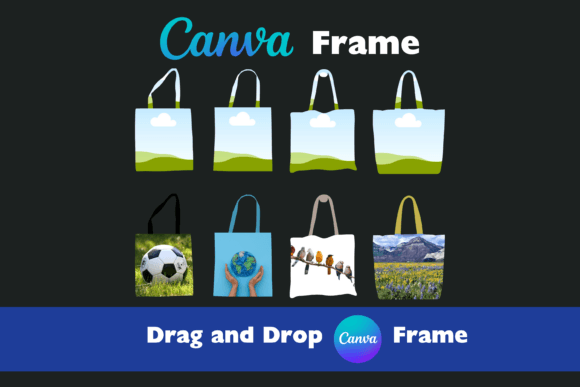
Creating professional merchandise no longer requires a background in graphic design or expensive software. For entrepreneurs, content creators, and small business owners, the ability to produce high-quality branded items quickly is a significant competitive advantage. This is where the utility of Canva Frame Tote Bag Templates truly shines, offering a bridge between creative vision and tangible products. These templates utilize Canva’s powerful frame feature, allowing you to apply your artwork to a realistic tote bag mockup with just a few clicks. The visual appeal of these templates lies in their realism; they present your design as it would look in the real world, complete with shadows, fabric textures, and natural folds. This isn't just about slapping a logo onto a blank canvas; it's about understanding how your design interacts with the medium. The personality of these templates is professional yet accessible, making them perfect for anyone looking to visualize their brand identity on physical goods.
The process is straightforward and designed for efficiency. Once you have access to the files, which are provided as high-quality PDFs without any distracting watermarks, you simply upload them to your Canva account. If you don't already have one, signing up for free is quick and easy. From there, the magic happens. You drag and drop your images—whether they are intricate illustrations, bold typographic logos, or photographic patterns—directly into the frame. The template automatically adjusts your image to fit the shape and perspective of the tote bag. A particularly clever design element is that the handles are separate from the bag body. This detail offers surprising flexibility; you can experiment with different handle colors to match your brand palette or create a contrasting accent that makes your main design pop. This level of customization ensures that your final product isn't just a generic mockup but a thoughtful representation of your creative work.
Where These Templates Fit Into Your Creative Workflow
The applications for these templates extend far beyond simple product visualization. For designers and brand strategists, they are invaluable tools for client presentations. Showing a client how their logo looks on a tote bag can make the abstract concept of brand identity feel concrete and exciting. It helps in evaluating how a serif font or sans serif font holds up at different scales, or how a script font might need adjustment for readability on a textured surface. Marketers and bloggers can use them to create compelling social media graphics. Imagine announcing a new product line or a giveaway with a realistic image of a tote bag featuring your design; it’s far more engaging than a flat image. Content creators and publishers can use these templates to design merchandise for their audiences, strengthening community and brand recognition. For small business owners, it’s a chance to explore packaging design options or create branded bags for retail without the upfront cost of ordering physical samples.
The influence on your design process is practical and immediate. When you see your design on a tote bag template, you gain perspective on visual hierarchy. Is the main message clear from a distance? Does the color palette work well against the fabric's implied texture? This real-world testing ground can save you from costly mistakes before you ever commit to a print run. The templates encourage you to think about consistency across your brand assets. If you’re using a modern typography style for your website, seeing it applied to a physical item helps ensure that your brand perception remains cohesive. The professional quality of the mockups elevates your work, making even a rough draft look polished. This is crucial for maintaining a professional image, especially when sharing concepts with collaborators or clients. The ability to quickly generate multiple variations—different handle colors, different placements of your design—fosters experimentation and can lead to more creative and effective outcomes.
Practical Guidance for Using Canva Frame Tote Bag Templates
Getting started is simple. After downloading the provided files, upload the PDF into Canva. Then, edit the template by replacing the placeholder image with your own. Use Canva’s tools to adjust the size, position, and rotation until you’re satisfied. Once your design is complete, download the final image to your computer in a high-resolution format suitable for digital use or printing. Remember to save the source of these templates to your favorites; this allows you to get notified when new designs are released, keeping your toolkit fresh and versatile. When choosing which template to use, consider the personality of your project. A minimalist brand might opt for a template with clean lines and subtle shadows, while a more vibrant, artistic brand might choose one with a more pronounced texture. Evaluate the fit by looking at the overall composition; does the tote bag’s shape complement your design’s aspect ratio?
Testing font pairings and color schemes within the template is a smart step. A premium font that looks great on a screen might need its letter-spacing adjusted for the mockup. Pay attention to readability; a highly decorative handwritten font might be perfect for a logo but less effective for longer text. The included styles in these templates—often varying in angle, lighting, or background—give you options to match different contexts, whether for a web design header or a print-on-demand catalog. While the templates are primarily for visualization, the final high-quality images you create are yours to use. They are excellent design assets for social media posts, website banners, email newsletters, and digital portfolios. For commercial use, always ensure your uploaded designs are original or properly licensed. These templates themselves are tools to help you create, and the resulting images are part of your brand identity toolkit. They help bridge the gap between digital design and physical product, making them a valuable resource for anyone serious about presenting their work professionally.